
Why is a technical check of my device required?
What exactly is the Security Checker?
Is there any additional information about the Security Checker?
What should I do if I experience problems?
Why is a technical check of my device required?
Our clients have continuously increasing security requirements. If you work on a client project, we must ensure that your work device meets the required security standards. You have agreed to these requirements as part of your contractual obligations.
We ensure this through two measures:
- Verification of your working environment during onboarding/address verification.
- Running the yoummday Security Checker on your device.
In general, you can always log in to our platform. However, to work on projects, you must provide proof that you are using a secure device. The Security Checker helps you do this.
If the Security Checker is not used regularly, some platform features may not be available to you (for example, shift scheduling).
What exactly is the Security Checker?
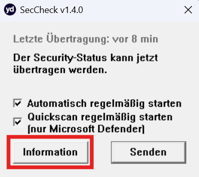
The Security Checker is a simple Windows application that can be downloaded from the yoummday portal. The program does not require installation and can be run directly.
The Security Checker reads the following security-related information from your system and sends it to the yoummday server:
- Status, history, and update status of your antivirus software.
- Status of your hardware environment, operating system, and operating system updates.
- Status and update status of your web browser.
- Unique system ID and Windows version.
- Your IP address ("heartbeat", transmitted periodically).
The information that will be sent can be reviewed beforehand using the “Information” button.
By transmitting this data, our platform can determine whether your device is secure ("compliant") according to the IT security requirements you have accepted contractually.
This status is also used to determine whether you can access all relevant work-related functions (for example, shift scheduling).
The data can be transmitted either:
- Manually by clicking the "Send" button, or
- Automatically in the background once you have enabled this feature.
No personal data is read from your system, and no data or system configurations are modified.
Is there any additional information about the Security Checker?
Do you have further questions about how it works? Please review the presentation for a comprehensive overview.
Alternatively, you can find answers to frequently asked questions here:
FAQ about the Security Checker
What should I do if I experience problems?
Do you have additional questions or are you experiencing issues with the application? Please check the relevant knowledge base articles.
You can find answers to frequently asked questions here:
Tips and guidance on how to achieve a "compliant" status can be found here:
Tips and solutions for technical issues can be found here:
If the knowledge base articles do not resolve your question or issue, please contact the Talent Support Team.