
Under your profile picture, you can see that your yoummday profile is divided into three sections. In this article, we focus on "My Skills." 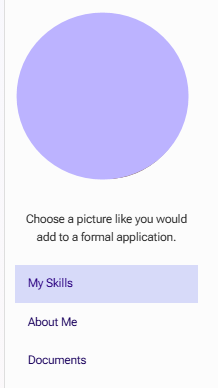
How do I create a voice recording?
How do I fill out my contact center experience?
How do I fill out my soft skills?
How do I fill out my industry experience?
How do I create a voice recording?
The voice recording is the first item in the "My Skills" section of your profile.
Before you begin, select whether you want to use Softphone or Webphone in the top navigation bar of the platform.

We recommend using the Webphone, as the Softphone requires additional software.
Keep in mind that your voice recording is often the first impression clients get of how you sound on the phone. The quality, pronunciation, friendliness, and confidence of your recording are often even more important than the content itself.
Step 1
-
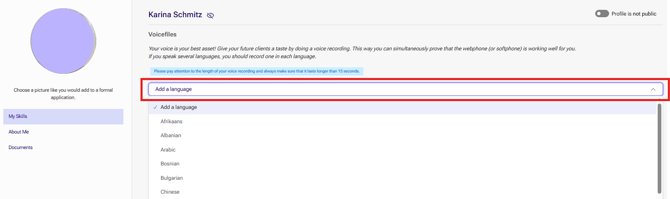
- Click "Add Language" to add a language.
Step 2
-
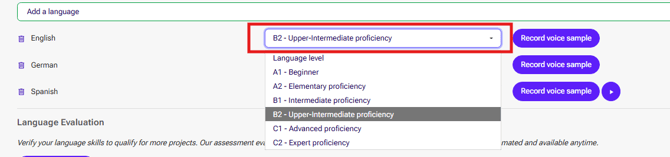
- Select your language proficiency level.
Step 3
- Click "Start Recording."

Step 4
- Click "Start now"
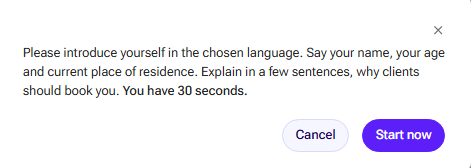
Note: Your recording must be at least 15 seconds long to be considered valid.
Step 5
- In the pop-up window, click "Accept Call."
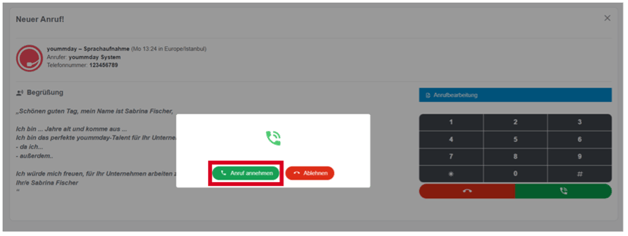
- You will hear a voice guiding you through the recording process.
- A sample text will also be displayed for reference.
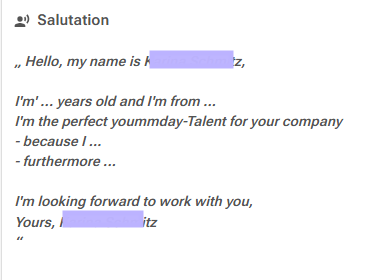
- After the signal tone sounds, begin your recording.
Step 6
- Your recording will automatically end after 30 seconds.
- If you finish earlier, press 1 on your telephone keypad.
- Your recording will be played back to you, and you can choose one of the following options:
- 1 – Listen to the recording again
- 2 – Start a new recording
- 3 – Save the recording
Step 7
- Once your recording has been saved, you can listen to it again by clicking the round button to the right of "Start Recording."

Not satisfied with your recording?
Simply click "Start Recording" again and repeat the process. Only your most recent recording will be saved.
How do I fill out my contact center experience?
This section allows you to specify any previous customer service experience you have and indicate the areas in which you have worked.
If you have no previous contact center experience, don't worry. Every project includes training before you start.
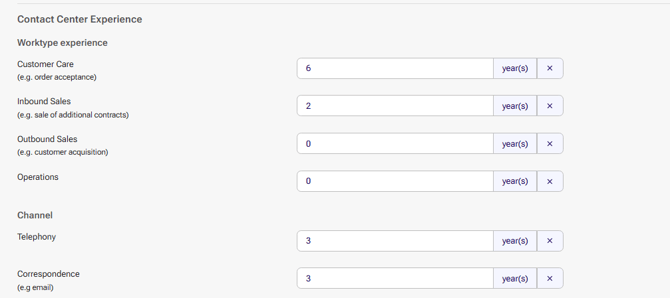
Be sure to indicate:
- Which work types you have experience in
- Whether you have worked in telephone support
- Whether you have worked in written customer communication
Even if you have never worked in a contact center, you can still mention relevant experience from related office or service roles.
For example:
- Secretarial work
- Administrative support
- Reception duties
- Customer-facing office work
Depending on the nature of your previous role, you may still be able to indicate experience in telephone or written communication channels.
How do I fill out my soft skills?
You can select up to five soft skills that best describe your strengths.
This assessment is entirely subjective. Consider:
- Which qualities best represent you in a professional environment
- How you interact with colleagues
- How you communicate with customers
Choose the skills that most accurately reflect your working style and personality.

How do I fill out my industry experience?
You can further strengthen your profile by selecting industries in which you already have experience.
You may choose up to 10 industries at the same time.
Adding relevant industry experience helps clients better understand your background and can improve your chances of matching with suitable projects.

Next Step
To continue completing your profile, proceed to the following article:
How Do I Complete the "About Me" Section of My Profile?