
Where can I add a new address?
How can I change my billing address (within the same country)?
How can I get a new work address approved?
On our platform, you can store two types of addresses:
- Billing address
- One or more work addresses
You always have exactly one active billing address, but you can have multiple active work addresses.
If you are currently working on a project, please always inform your Talent Coordinator about any address changes, especially if the new address is in a different country.
Where can I add a new address?
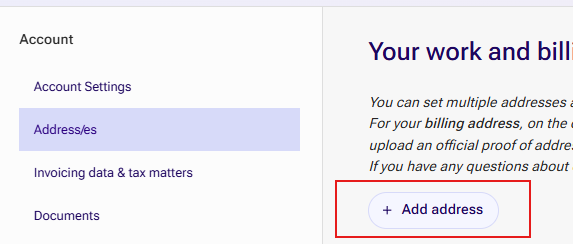
You can manage all addresses under Account → Address(es).
Click “Add Address.”
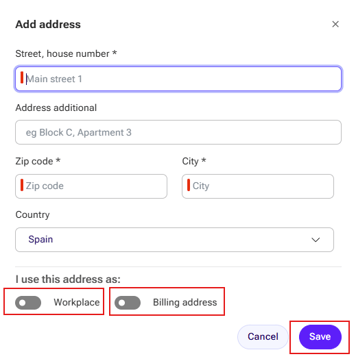
Enter your new address.
- Select whether the address should be used as:
- a new work address,
- a new billing address, or
- both.
- Click “Save” to confirm.
What is the billing address?
The billing address is the address shown in the header of your credit note/invoice document and represents the registered address of your business.
It determines the tax and data protection regulations that apply to you based on your country's legal requirements.
Important:
- You can only have one billing address at a time.
- When you add a new billing address, the previous one is automatically deactivated.
The country of your billing address cannot be changed afterward. If you need to change the billing country, you must create a new account.
How can I change my billing address (within the same country)?
- Add the new billing address under Account → Address(es).
- Upload a new proof of address document under Documents.

Contact Talent Support as soon as possible so that your new address can be verified before the next invoice/credit note is generated.
Once verified:
- Your old billing address becomes invalid.
- The new billing address will appear on future credit notes.
Please note: Previously issued credit note documents cannot be corrected.
What is the work address?
The work address is the location where you perform your services, meaning your physical workplace.
Depending on the project, it may be possible to work from multiple locations. However, every work address must be known and verified.
Important:
- Some projects may have restrictions or require additional checks.
- Always inform your Talent Coordinator in advance about any new address.
- If you are working on an EU project, adding a new address could even result in your contracts being automatically terminated.
How can I get a new work address approved?
Add the new address as a work address under Account → Address(es).
Book an address verification appointment.
The booking button appears directly below the address after it has been saved. 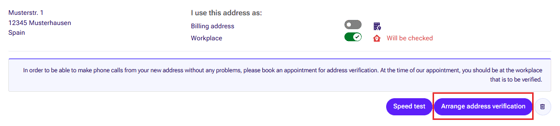
During the appointment:
- Your workplace will be reviewed.
- The location will then be approved and activated.
Be sure to have your mobile phone with the yoummday app available for the location verification and that the GPS is working correctly before the appointment, so the verification team can see the correct coordinates.