
As part of the transition of our payment process, payouts for Self-Service projects will be processed through our payment service provider Lemonway going forward.
Lemonway is a regulated European payment institution and will handle the technical wallet and payout process.
To receive your earnings from Self-Service projects, you will need to complete a one-time Lemonway onboarding.
What do you need to do?Before your first payout can be processed through Lemonway, the following steps must be completed successfully:
- Open your personal Lemonway onboarding link
- Create your Lemonway account
- Complete your KYB verification
- Complete your IBAN verification
- Wait for your Lemonway wallet to be approved
Once all steps have been completed, payouts can be transferred via Lemonway to your verified bank account.
Before you start
We recommend having the following information and documents ready.
Personal information- full legal name
- date of birth
- residential address
- email address
- phone number
Depending on your business type, you may need:
- company name
- company registration number
- VAT ID, if applicable
- registered business address
- tax information
Depending on your business type and country, Lemonway may request:
- government-issued photo ID
- company registration document
- proof of business ownership
- additional business documents if required
The exact documents required depend on your business type and country.
Step 1 – Open your personal onboarding link
yoummday will send you a personal Lemonway onboarding link.
Please note:
- The link is valid for 7 days.
- It is personal to you and must not be shared.
- It is a single-use onboarding link.
- Once you have started the process, please continue it on the same device.
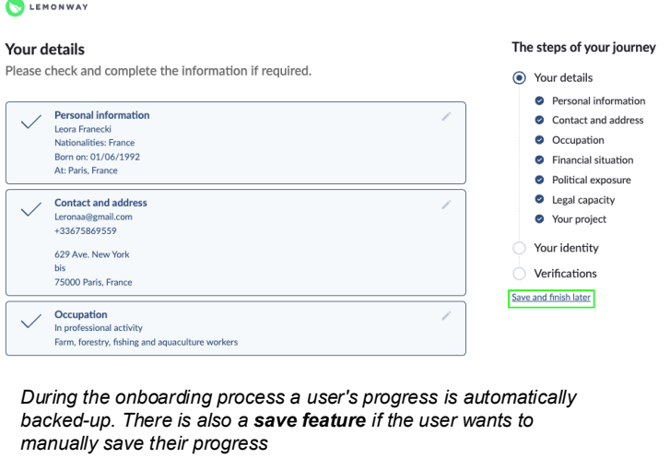
- You can save your progress and continue the onboarding later.
Step 2 – Create your Lemonway account
Follow the instructions shown during the Lemonway onboarding.
You will be asked to:
- confirm your email address,
- provide your personal information,
- provide your business information.
Please make sure that all information exactly matches your official documents.
Incorrect or incomplete information may delay verification.
Step 3 – Complete your KYB verification
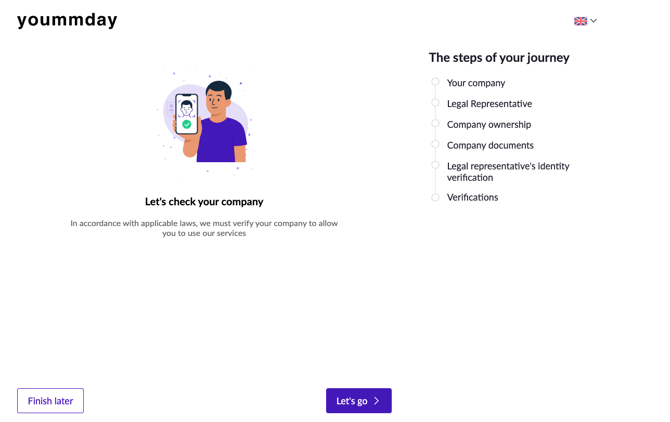
KYB stands for Know Your Business.
This is a legally required verification process that Lemonway, as a regulated payment institution, must perform before your wallet can be fully activated.
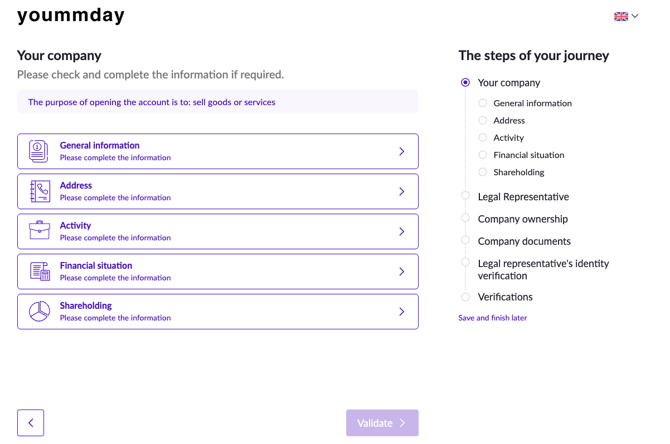
During this process, you may be asked to:
- enter or confirm company details,
- provide ownership information,
- upload business documents,
- upload identification documents.
If additional information is required, you will be notified.
Step 4 – Review and submit
Before submitting your onboarding:
- Check that all information is correct.
- Make sure all uploaded documents are complete and clearly readable.
- Submit your information for verification.
Step 5 – Verification by Lemonway
After submission, Lemonway will review your information and documents.
Possible statuses include:
In Review
Your documents are currently being checked.
Accepted
Your verification has been successfully completed.
Rejected
Some information or documents are missing, unreadable or incorrect. You will need to update them and resubmit.
Denied
Lemonway cannot approve the wallet due to regulatory requirements.
Business verification can take up to 48 hours, although individual identity verification may be completed faster.
Step 6 – Your Lemonway wallet is activated
Once your KYB verification has been approved:
- your Lemonway wallet will be created,
- your wallet can be prepared for the new payout process.
If Lemonway requires additional documents later, you will be notified.
What happens if my application is rejected?
A rejection usually means that:
- a document is missing,
- a document cannot be read clearly,
- information does not match the submitted documents.
You will be informed about what needs to be corrected.
You can then update the requested information or documents and submit them again.
Step 7 – Verify your bank account / IBAN
Once your KYB verification has been approved, the bank account that should receive your payouts must also be verified.
For this purpose, we require a valid bank statement or bank account document.
Please send it to:
partnermanagement@yoummday.com
Our Partner Management team will then submit the document for IBAN verification with Lemonway.
The document must clearly show that the bank account belongs to you or to your verified business.
What happens if my IBAN verification is rejected?You may be asked to:
- provide a clearer document,
- provide a more recent bank statement,
- correct your IBAN,
- provide proof of a bank account belonging to the verified individual or business.
Once corrected, the IBAN can be submitted for verification again.
Step 8 – You are ready to receive payouts
Once both of the following have been successfully completed:
- ✅ KYB verification
- ✅ IBAN verification
your Lemonway wallet is fully set up for payouts.
From this point on:
- earnings from Self-Service projects can be assigned to your Lemonway wallet,
- payouts can be transferred to your verified bank account.
Important: yoummday can only process payouts through the new payment flow once your wallet, KYB and IBAN have all been successfully approved.
What changes for my compensation?
Your compensation will continue to be recorded and approved via the yoummday platform as before.
Only the technical payout process will move to Lemonway.
The existing payout cycle also remains unchanged:
Payouts will continue to take place on the 18th of each month.
Frequently Asked Questions
-
Can I finish the onboarding later?
-
Yes. If you cannot complete the process in one session, you can save your progress and continue later.Please continue using the same device on which you started the onboarding.
-
-
Your personal onboarding link is valid for 7 days.
-
Why does Lemonway ask for business documents?
-
As a regulated payment institution, Lemonway is legally required to verify businesses and self-employed individuals before activating payment wallets.This verification is part of European anti-money laundering requirements.
-
-
Can I change my information later?
-
If you notice an error before submitting, you can simply correct it. If information needs to be changed after submission, please contact Partner Management regarding your Lemonway onboarding: partnermanagement@yoummday.com
-
-
What happens if I do not complete the onboarding?
- Without successful Lemonway onboarding, your wallet cannot be fully activated. This means that payouts for Self-Service projects cannot be processed through Lemonway.
- Who should I contact if I need help?
For questions regarding:
- Lemonway onboarding
- KYB verification
- wallet approval
- IBAN verification
please contact:partnermanagement@yoummday.com
For technical issues, please include if possible:
- your name
- the email address used for Lemonway onboarding
- a short description of the issue
- screenshots, if available
For all other questions regarding your talent account, projects or the yoummday platform, please continue to contact the Talent Support team.